Alienware x14 review: A portable gaming laptop that doesn’t suck

Alienware x14 review: A portable gaming laptop that doesn’t suck

For years, Alienware eschewed thin-and-light gaming laptops, opting instead to make slightly bulkier systems with more affordable pricing. But all that changed last year with the introduction of its X-series notebooks. And now, Alienware is pushing its quest for sleekness even further with the new x14, the company’s thinnest and lightest gaming laptop yet. To add even more rum to the punch, the x14 is also one of the first gaming laptops available featuring Intel’s latest 12th-gen mobile CPUs. And while the x14 isn’t without its quirks, the result is a machine that makes me wish Alienware had gotten into portable gaming rigs years ago.

Design

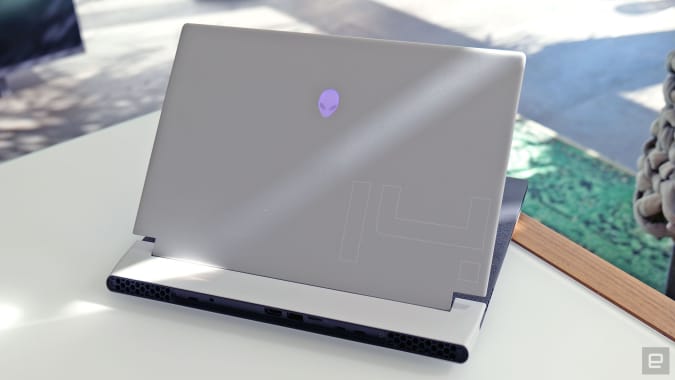
Sporting Alienware’s Legend 2.0 design language, the x14 is without a doubt a striking system, though ultimately you’ll need to decide how much you fancy its sci-fi aesthetics. What’s not in question is the laptop’s thinness, which stands at just 0.57 inches thick while weighing barely more than four pounds. That’s even thinner and almost a pound lighter than the x15 (0.63 inches and 5 pounds), while making Alienware’s more mainstream M15 R7 seem almost bloated (0.8 inches and 5.3 pounds).

Pros

  • Slick design
  • Vibrant screen with Dolby Vision
  • Highly portable
  • USB-C power brick
  • Good performance and value for the size

Cons

  • Somewhat cramped keyboard layout
  • No side-mounted ports
  • Noisy fans
  • Mediocre 720p webcam
  • Short battery life during gameplay

Unlike its larger siblings, the x14 lacks the extra light ring that normally wraps around the backside of the system.

Sam Rutherford/Engadget

Now I’m not normally the type to lust after a few ounces or tenths of an inch getting shaved off a device, but on the x14, every little reduction matters. That’s because while most gaming laptops don’t even come close to fitting in my everyday messenger bag that’s not meant to stash anything larger than a 13-inch ultraportable, the x14 actually fits, if just barely.

That means I’m much more likely to bring this thing with me on trips, which is kind of the whole point of a thin-and-light gaming notebook. Don’t get me wrong, I appreciate beastly 17-inch gaming rigs, but when my back starts to hurt at the mere thought of carrying one around, in practice those systems often function more like mobile desktops than any sort of travel-friendly gaming machine.
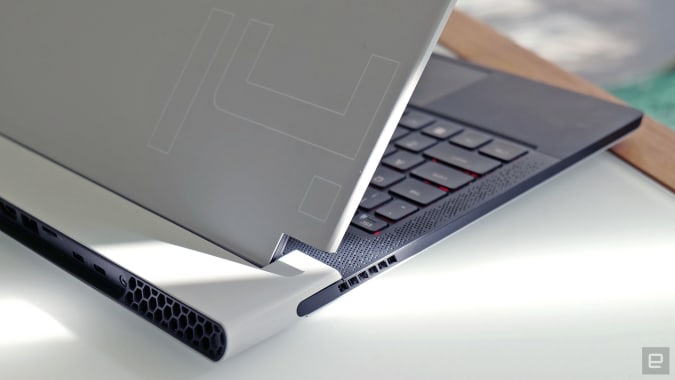
Alienware's new dual-torque hinge for the x14 helps increase screen stability white reducing excess size and weight.

Sam rutherford/Engadget

The main innovation on the x14 is Alienware’s new dual-torque hinge which adds strength and stability to the laptop’s display, while once again reducing weight and thickness compared to previous X-series machines. And, as you’d expect from Alienware, the x14 comes with customizable RGB lighting on its lid and keyboard. That said, compared to its larger siblings you do lose the extra RGB light ring that would normally outline the system’s rear ports. (Fun fact: That pill-like shape is actually called a stadium.) Inside, there’s a lovely soft-touch finish on x14’s wrist rest, which may feel a bit cramped for people with larger hands.

Display and sound

On the x14 there’s only one display option, and it’s a good one. The 144Hz 1,920 x 1,080 screen is plenty sharp, while support for NVIDIA’s G-Sync helps
Read More

iBuypower Intel 12th Gen Z690 i7 DDR4 Gaming PC Review: One Way to Get Parts

iBuypower Intel 12th Gen Z690 i7 DDR4 Gaming PC Review: One Way to Get Parts

Let me tell you a story: Back in 2020 the world shut down, and a confluence of supply and demand issues, a chip shortage, surging cryptocurrencies and a global pandemic made a number of tech-related products difficult to impossible to buy. Flash forward to today and things are still sort of that way–at least when it comes to graphics cards.

These ongoing issues continue to drive the sales of pre-built systems, including those on our list of the best gaming PCs. With the launch of Intel’s 12th Gen “Alder Lake” chips, which are particularly impressive when it comes to gaming, iBuypower has released its “iBuypower Intel 12th Gen Z690 i7 DDR4 Gaming” PC. The name is definitely a mouthful, but it’s more of a configurator for numerous Intel-based PCs than anything else. And there’s a fair bit to like when it comes to performance.

The iBuypower model we reviewed sports an Intel Core i7-12700K, an Nvidia GeForce RTX 3070 and one of iBuypower’s own cases. And in our testing, it held up against and/or surpassed last year’s models, though there is some room for improvement.

Design of the iBuypower 12th Gen Z690 i7 Gaming PC

Image 1 of 3

iBuypower 12th Gen Z690 i7 DDR4 Gaming

(Image credit: Tom’s Hardware)
Image 2 of 3

iBuypower 12th Gen Z690 i7 DDR4 Gaming

(Image credit: Tom’s Hardware)
Image 3 of 3

iBuypower 12th Gen Z690 i7 DDR4 Gaming

(Image credit: Tom’s Hardware)

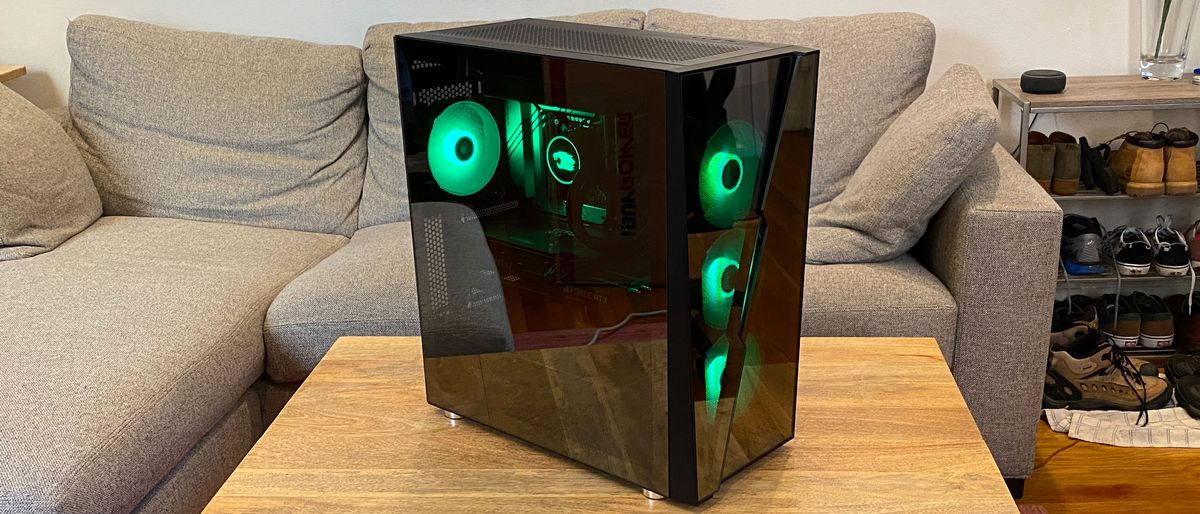
This PC was built in iBuypower’s own Slate Hako MR case, which is a pretty standard case with a dash of attitude.

It’s hard not to notice the very front of the case, which is a bit unusual. It’s tempered glass, which shows off three 240 mm case fans in their RGB glory. It’s a dark glass, however, which makes it highly reflective and only shows the most lit-up parts. If you don’t have a lot of RGB, you won’t be able to see your parts well. Whether or not that’s a pro or a con is a matter of personal taste.

There’s a bit of venting on the right side of the case to let in some air, but there’s also some smack dab in the middle of the front. The effect kind of looks like a lightning bolt, but with a space in the middle to allow for a bit of airflow. Both edges of the bolt overlap to create a layered effect. Between the lightning and the pattern, my wife referred to it as “very David Bowie,” which I’m told was a compliment. But if you don’t like the look, iBuypower offers a staggering 19 other options, although some add significantly to the price of the system.

The left side of the desktop features more tempered glass, letting you see into the case. For our review unit, that featured a smattering of RGB on the four case fans and on the pump for the CPU cooler. I’m of the opinion that this is a tasteful amount of lights. The right side panel, like on many cases, is an aluminum door that slides off.

There are a

Read More

Monster Hunter Rise review | Computer system Gamer

Monster Hunter Rise review | Computer system Gamer

Will need to Know

What is it? Murder monsters then make cute hats out of their faces.
Be expecting to pay out £50/$60
Developer Capcom
Publisher Capcom
Reviewed on GeForce GTX 1070, 16GB RAM, i7-7700HQ
Multiplayer 4-player co-op
Hyperlink Official web-site

A legitimate pleasure around my life time in gaming has been viewing Monster Hunter go from a specialized niche favorite to wild accomplishment in Japan, and little by little producing inroads in the west before—with Monster Hunter: World—smashing by means of and getting a international strike. That’s most likely about-simplifying the arc for Capcom’s beast-bashing grindathon par excellence, but the sequence now has a substantial fanbase and the kind of useful resource driving it that has resulted in many years of much better and far better online games, as well as a unique split.

There’s the Monster Hunter: Globe just take on the series, which has the fundamentals but is a seriously big-spending plan endeavour—a visible and aural spectacle with stunning, flowing animations and jaw-dropping monsters. Monster Hunter: Increase is the other branch, subsequent in the footsteps of game titles like Generations and hewing nearer to the series’ portable heritage: Lesser, much more contained maps instead than larger sized additional open up-globe type exploration.

Using the grapple in Monster Hunter Rise.

(Impression credit history: Capcom)

Rise was, of course, initially intended as a Nintendo Switch exclusive and, while this Laptop release is a very good port with all the things you would expect, it has nowhere in the vicinity of that quick visible ‘wow’ factor that Earth did. Nor can it contend on points like textures or the stunning bespoke animations for monsters fighting each individual other.

Matter is, though, Rise is the much better game.

Monster Hunter’s trouble for new players is also the game’s most important power: This is a combat program of virtually unparalleled depth and precision, with literally dozens of fundamentally different playstyles. It is frustrating at first. Rise has very easily the ideal onboarding encounter in the collection, and in the system introduces many new mechanics that enrich the looking experience even over and above Generations.

Just one of the most enjoyable additions is your Palamute, a rideable canine. You’ve however received your Palico, of system, but the canine transforms the game’s traversal which, arguably, was usually a weak—or at minimum not standout—element. Series veterans will recall quite a few a extensive slog across maps you know like the again of your hand, only for the reason that that is the way points had been, but in Increase your options with and with out the pet dog now include things like wall working and a Spider-Male-style grapple that doubles up as an critical struggle software. You can not only get about speedier than at any time, but it feels amazing to do so.

This in change changes up the rhythm of fights but in an magnificent way. In older Monster Hunters, there normally will come the place in a fight wherever your quarry realises they’re in a location of bother and

Read More

2022 technology trend review, part one: Open source, cloud, blockchain

2022 technology trend review, part one: Open source, cloud, blockchain

In the spirit of the last couple of years, we review developments in what we have identified as the key technology drivers for the 2020s in the world of databases, data management, and AI. We are looking back at 2021, trying to identify patterns that will shape 2022.

We start today with a review of open source software, the cloud, and blockchain. We will continue in the coming days with a review of AI and knowledge graphs.

Open source and cloud

Open source software has been on the rise for a while, and we don’t see any signs of this growth slowing down. According to Gartner’s 2021 Hype Cycle for Open-Source Software (OSS): “Through 2025, more than 70% of enterprises will increase their IT spending on OSS, compared with their current IT spending. Plus, by 2025, software as a service (SaaS) will become the preferred consumption model for OSS due to its ability to deliver better operational simplicity, security, and scalability”.

Gartner’s predictions of open source at large are even bolder and more specific when it comes to open source in the database and data management world. As far back as 2019, Gartner predicted that the future of databases is the cloud, and that future of databases is also something else: it is open source.

By 2022, Gartner predicted, more than 70% of new in-house applications will be developed on an open-source database, and 50% of existing proprietary relational database instances will have been converted or be in the process of converting. At the dawn of 2022, it’s hard to verify the accuracy of these predictions.

What we can do however, is offer a reasonable, even if a bit of a cliche by now, explanation. Gartner also offers a hint to this, by linking OSS and the cloud via SaaS. OSS can mobilize people beyond the boundaries of a single organization to contribute to high-quality software, and it can skip the line in enterprise sales and establish a presence by winning developer hearts and minds. Those are widely acknowledged facts by now.

In the database and data management world, especially when it comes to analytics and AI, the focal point is the data. The reason why those databases and data management systems operate in the first place is to collect the data that will be used to build analytics and AI applications.

For many organizations, databases and data management systems become somewhat of a commodity that is best operated in the cloud, where resilience and elasticity is someone else’s job. This way, organizations can focus on their core mission, which is to use the data to deliver value.

multi-cloud.jpg

Cloud and open source are the great enablers for databases, data management systems and machine learning platforms


By Who is Danny — Shutterstock

While it’s hard to verify the accuracy of Gartner’s predictions concerning the prevalence of OSS in the world of data, we can look at some indications as a proxy for this. First, in January 2021, OSS

Read More

Wahoo Elemnt Bolt review: Second-generation cycling computer sees colour screen, improved mapping and more

Wahoo Elemnt Bolt review: Second-generation cycling computer sees colour screen, improved mapping and more

The short history of Wahoo cycling computers can be likened to an ever-swinging pendulum, in which Wahoo switches its focus between launching a feature-rich device, then trying to cram those features into a smaller package and back again. 

When the first Wahoo Elemnt Bolt arrived on the scene in 2017, it was that exact story. Wahoo took everything good about the original Elemnt – launched in 2015 – and squeezed it into a device that weighed 40 per cent less and boasted an aero leading edge. Then in 2019, the pendulum swung back the other way and the Elemnt Roam was launched as the brand’s new all-singing model with colour screen, on-device mapping and more. 

2021 saw the launch of the new Elemnt Bolt, and with it, Wahoo’s tact changed, but only ever so slightly. Designers have definitely taken everything great about the Roam and crammed it into a smaller Bolt-sized package, but this time they didn’t stop there. They also looked at everything that wasn’t quite so good and, well, fixed it. Or at least that was the claim from Wahoo, once you read between the lines a little. 

At a glance

What is it?
Wahoo’s aero-shaped, small-form-factor GPS cycling computer that boasts a rich feature list, Bluetooth and ANT+ connectivity and more.

Who is it for?
It’s marketed towards cyclists of all type, age and ability, both on-road and off, who want to track detailed ride metrics and get directions on the go. Its price aims it at the cycling enthusiast rather than the pure commuter or leisure cyclist, and it boasts a range of features that cater to the most data-driven athletes and racers.

Weight
69g / 2.43oz

Price
£249.99 / $279.99 / €279.99 / AU$419.95

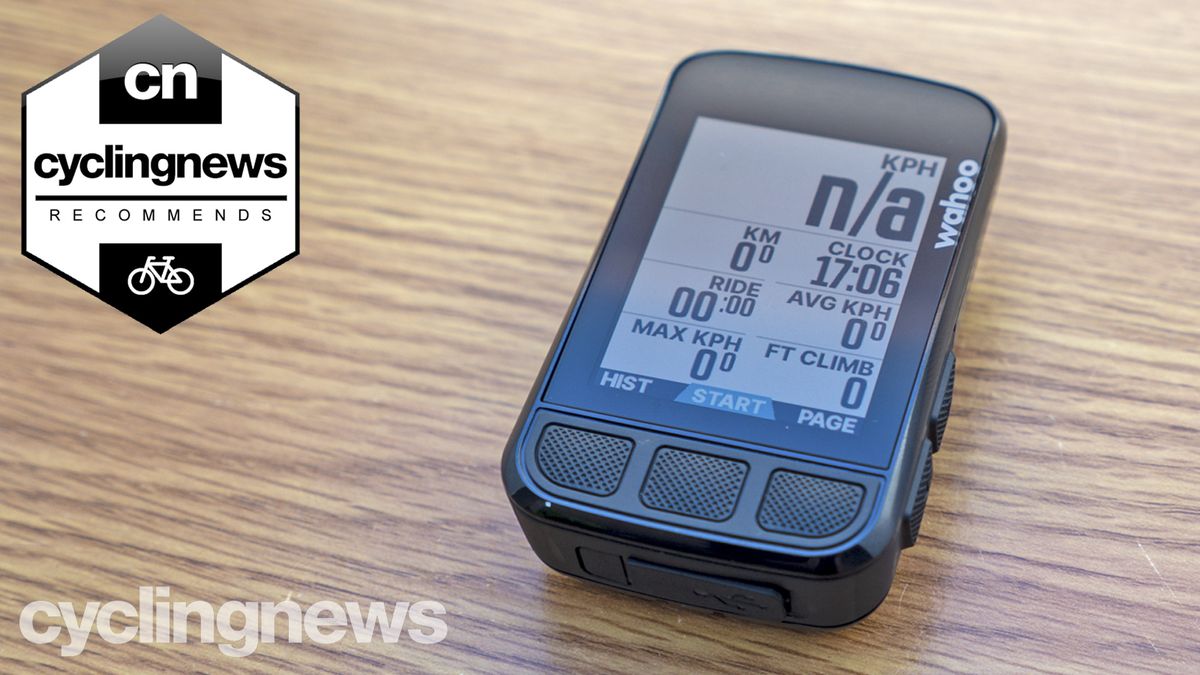
What that meant is that the new Elemnt Bolt got the colour screen and on-device navigation from the Roam, but it got a better screen with more colours, a more detailed base map. It also got a USB-C charging port, convex buttons and an increase in onboard memory. All of which combine, on paper at least, to make a computer that should easily be a contender for our guide to the best cycling computers

I have already deemed the Bolt victorious in the Bolt vs Roam head to head tests that I ran earlier this year, and I’ve been using the Elemnt Bolt V2 (although it’s not actually called the V2, since the old version is no longer produced) as my main cycling computer ever since, to formulate an in-depth review and work out whether Wahoo’s changes have actually yielded an improvement to the second iteration of the Wahoo Elemnt Bolt. 

Image 1 of 8

Wahoo Elemnt Bolt

The Wahoo Elemnt Bolt (Image credit: Josh Croxton)
Image 2 of 8

Wahoo Elemnt Bolt

Complete with various upgrades over the former, which include a colour screen, convex buttons, USB-C charging and more (Image credit: Josh Croxton)
Image 3 of 8

Wahoo Elemnt Bolt

It continues with the aero shape theme, but with a slightly
Read More